


About Fortnite Items
In Fortnite: Save the World (aka. Fortnite STW or STW), there are various items that players can obtain and use to enhance their gameplay experience. These items serve different purposes and can be acquired through various in-game activities. Here are some of the items people can find in the game:
• Weapons are essential for defending against Husks and completing missions.
• Traps can be used to fortify defenses and slow down Husks.
• Resources are materials for building structures, crafting weapons, and creating traps.
• Ammunition (Ammo) is necessary for firearms and ranged weapons.
These are just a few examples of the items players can find in STW. The game offers a wide variety of items to collect, customize, and use in battles against the Husks. People can experiment with different strategies and item combinations to maximize their effectiveness in the game.
Fortnite Item Delivery Method
Face-to-Face
Note:
1. Please input your Display Name and Epic Games Email Address in the order. If you have different Epic Games Email Addresses for different platforms, then give us the one of your PC platform, which is the easiest way for us to find you in the game.
2. Accept our supplier's friend request in the game. Make sure your account automatically accepts friend requests.
3. Our supplier will invite you to a party and create a map.
4. The supplier will drop the item(s), then you can pick the item(s) up.
Fortnite: Save the Wrold Item Delivery Time
We can complete most orders within 24 hours after the payment confirmation. Please make sure your account automatically accepts friend requests so that our supplier can invite you to a party quickly and deliver what you need. We also have a table showing the delivery time of orders during the past 48 hours.
How to Buy Fortnite: STW Items at MmoGah
Are you looking to buy Fortnite items but don't know how to go about it? Worry no more, as MmoGah makes it easy for you to purchase items whether you're using a PC, PS, or Xbox. Here's how to go about it:
First, choose the server, item, and quantity you want, then click "Buy Now". If you're purchasing multiple items, add them to the cart and proceed to checkout.
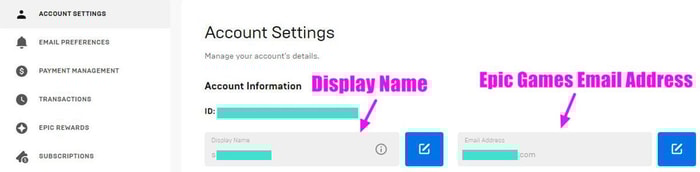
Second, provide your basic character information, including your Display Name and Epic Games Email Address, and click "Pay Now" to complete the payment process.
Where to Find Display Name and Epic Games Email Address
Please log in to your Epic Games account on the official website. You can find your Display Name and Epic Games Email Address in the Account settings.
How to Make Your Fortnite Account Automatically Accept Friend Request
For PS4 players, please go to your PS4 settings → account management → privacy settings → friends|connections → friend requests, then choose "Anyone".
For Xbox One players, please go to your Xbox settings → all settings → privacy & online safety → Xbox Live privacy → choose the "Adult default" account type → then choose View details & customize → You can join multiplayer games, then choose "Allow".


